


Universities are busy communities full of learning, group work, and new ideas. Yet many still rely on paper flyers that get ignored or mass emails that students rarely read. Managing campus-wide communication with university digital signage offers a current, practical answer to this problem.
It uses a connected network of digital screens and software to send fast, focused, and visually appealing messages across the whole campus. By swapping messy bulletin boards for clean, real-time displays, universities can make sure the right people see the right message at the right moment.
Moving to a digital-first communication plan is more than just putting screens on walls; it reshapes the student experience. Today’s students grew up with technology and expect information to be quick, interactive, and always up to date, just like their phone apps.
University digital signage cuts through the noise of posters, emails, and handouts and creates a single, clear platform that supports everything from daily notices to emergency alerts.
What is University Digital Signage for Campus-Wide Communication?
How University Digital Signage Works
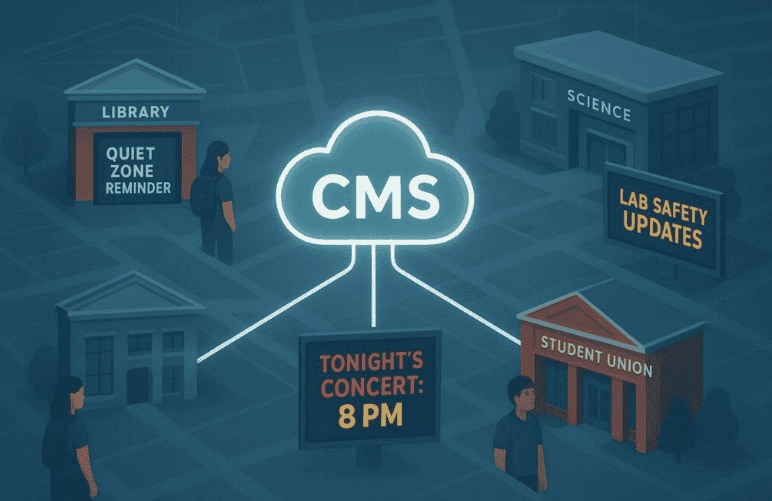
University digital signage brings together hardware, software, and clear planning. The hardware is made up of digital screens-from small tablets outside classrooms to large LED walls in student unions-connected to a network.
The central control is the Content Management System (CMS), usually cloud-based, which lets staff design, schedule, and send content to any screen on campus from one place. This removes the need to visit each display in person to change content, which used to be slow and easy to mess up.
The real success of a signage network depends more on content planning than on equipment. Modern platforms, such as Wallboard, offer simple drag-and-drop tools and ready-made templates. These features allow staff with no design background to create clean, professional slides and layouts.
Because the screens connect to the university’s internet, updates only take a few seconds, so a class schedule change or a new dining hall menu can appear almost immediately.
Benefits of Managing Campus-Wide Communication with Digital Signage
Improves Event Promotion and Student Engagement
Digital signage is highly effective for promoting events because it is bright, animated, and hard to ignore. While paper flyers often get lost in crowded spaces, a high-resolution video or moving graphic stands out. Universities can schedule these messages to appear during peak foot traffic times so more students see information about games, plays, concerts, workshops, and career fairs.
Enhances Wayfinding and Visitor Experience
Large or spread-out campuses can be confusing for new students and visitors. Digital wayfinding kiosks, such as the 19 units used at Davidson-Davie Community College, make it much easier to move around. These kiosks can show live updates about parking spots, shuttle routes, and building access, helping people plan the best route to where they need to go.
Supports Timely Emergency Notifications
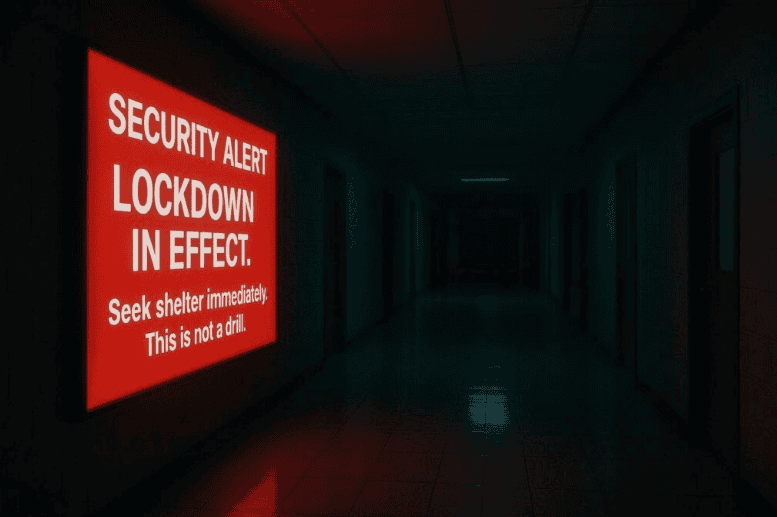
During emergencies, speed and clarity matter. Digital signage works as a real-time safety broadcast system that can take over regular content to show urgent warnings. Whether the issue is a storm, a security threat, or a fire, alerts can appear across campus within moments. Unlike phone alerts that might be muted or ignored, a large, bright warning on a big screen is hard to miss and quickly catches attention.
Campus Safety and Emergency Messaging
Real-Time Alerts and Public Safety Notifications
Safety is a top concern for colleges and universities. Digital signage should tie into the existing emergency notification system to add another layer of protection. During an incident, the system can automatically show pre-approved alert layouts.
Many campuses use a color system-for example, yellow for general safety info, orange for warnings, and red for major emergencies that require immediate action. This helps people quickly judge how serious the situation is.
Policy and Process for Displaying Emergency Information
Technology alone is not enough; clear rules and training are also needed. Universities should define who can trigger emergency messages, which types of alerts exist, and how to handle different situations.
Regular drills and tests help confirm that the alerts appear quickly and in the right places. Schools such as Penn State and the University of Maryland Baltimore have put in place detailed policies that other institutions can use as helpful examples.
Best Practices for Managing University Digital Signage
Content Standards and Approval Processes
To keep the network looking professional, universities should set clear content rules. These can cover font size, color use, motion speed, and logo placement. Many campuses give staff an “Asset Review Checklist” and a library of templates so that content from different departments still looks consistent.
An approval step-whether automatic or manual-helps catch errors, off-brand designs, or outdated information before anything goes live.
Accessibility and Inclusivity Considerations
University Digital signage should work for all users. This includes following ADA guidelines for screen height and angle, using large, high-contrast text, and avoiding overly busy designs. Interactive kiosks can add features such as audio guidance, text-to-speech, and controls that are easy to use from a wheelchair.
Content should also reflect the diversity of the campus community, so that students from different backgrounds see themselves represented in photos, stories, and examples.
Maintenance, Support, and Reporting Issues
A frozen or blank screen wastes a communication opportunity and can frustrate viewers. Universities should provide a simple way to report problems, such as an online form or shared helpdesk address.
Regular checkups, software updates, and cleaning help keep displays working and looking good. Often, IT and Facilities teams work together to fix both network issues and physical damage, keeping downtime to a minimum.
Common Challenges and Solutions in Campus-Wide Digital Signage
Coordinating Across Multiple Departments
Getting many departments to cooperate on one signage system can be difficult. Projects can stall if teams such as IT, Marketing, or Student Affairs feel they were added late or ignored during planning.
A better path is to involve all key groups from the start. By listening to what each department needs-such as branding control, technical reliability, or event promotion-the university can design a system that serves everyone and reduces resistance later on.
Ensuring Data Security and Privacy
Any networked system must protect against security threats. IT teams should confirm that the CMS uses safe login methods, supports encryption, and follows the university’s broader cybersecurity standards.
Only approved staff should have access to content tools and screen controls. When showing social media content or other user posts, moderation features are important to block offensive or off-topic material before it appears in public spaces.
Balancing Advertising and Campus Communication
Some institutions sell ad space on their screens to bring in extra money. While this can help with costs, too many ads can annoy viewers and lead them to ignore the screens completely.
A balanced approach is to give priority to campus-related content-such as events, services, and safety information-and limit ads to trusted partners whose messages support the university’s goals and values.