

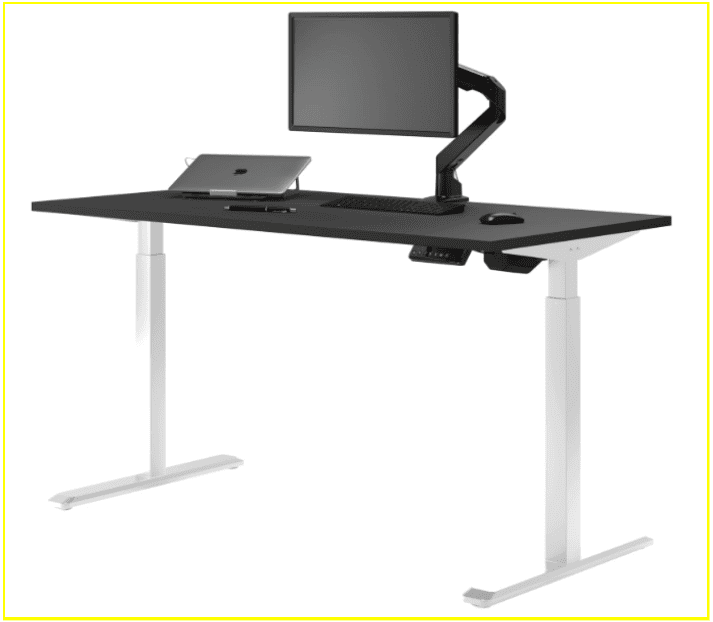
Quick Verdict
- #1 overall: Desky Dual Standing Desk. The only desk in this comparison with cable management built directly into the frame, app and Siri voice control, four height presets, sit/stand reminders, and a dual-motor system independently certified to BIFMA, EESS, and TÜV Rheinland standards. For anyone building a serious home office, nothing else on this list comes close.
- Runner-up: Vernal Core3. A functional up-down desk, but cable management costs extra, smart features are absent, and keeping good ergonomic habits relies entirely on you.
- Niche pick: FlexiSpot E7. High load capacity for heavy gear, but no app, no voice control, no reminders, and an open cable tray that leaves cord management entirely up to you. Fine for power users; a limited fit for most home offices.
Your home office setup shapes how well you work. Most people do not think twice about their desk until a shoulder ache or a tangle of cables turns a productive afternoon into a frustrating one.
This comparison covers three home office standing desks in 2026: Desky Dual, Vernal Core3, and FlexiSpot E7, evaluated through the lens of remote workers, WFH professionals, and anyone who spends significant time at their desk. The criteria: stability, cable management, smart features, height range, and desktop quality.
Desky Dual Standing Desk: The Smart Setup for a Clean Home Office
The Desky Dual Standing Desk brings a fully integrated height-adjustable setup to home offices, with cable management engineered into the desk frame rather than added as an afterthought. The quiet dual-motor system lifts up to 140kg smoothly, running at around 40 dB, low enough to adjust mid-call or during a recorded meeting without disrupting anyone on the other end.
Cable routing is where the Desky separates itself from both alternatives on this list. Purpose-built under-desk channels guide every cord neatly along the frame, and an optional integrated power board with up to nine outlets travels with the desk through every height change without snagging or stretching.
Built-in cable organization removes a consistent source of visual clutter for anyone managing a laptop, monitor, lamp, and phone charger in the same workspace. The Desky Dual made CNN’s list of the best cable management solutions [1], which reflects what users find in practice.
Height adjustment connects to a dedicated mobile app and responds to Siri voice commands, so switching between sitting and standing does not require reaching for a button. Four saved presets make the transition a two-second habit, and the built-in sit/stand reminder tracks how long you have been in one position, a practical feature for anyone who loses track of time during long work sessions.
The Desky Dual Hardwood stands as the bestseller in the range, and it is easy to see why. Solid hardwood is warmer and more durable than melamine or chipboard, and Desky’s hardwood pricing is competitive with other solid wood options on the market. Available finishes include White Oak, Red Oak, White Ash, Teak, and Walnut. That said, the desktop material is a personal preference; the Desky Dual frame performs the same across every desktop option.
The height range is 23.6″ to 49.2″, and the frame carries BIFMA, EESS, and TÜV Rheinland certifications. The full desk comes with a 10-year warranty on all parts.
YouTube URL:https://www.youtube.com/watch?v=sAzxDhoovuI&t=12s
Explore the Desky Dual Standing Desk at desky.com to build a home office setup that works as hard as you do.
“Customer service was great, delivery was fast. This piece is exactly what I needed in my office. The clips they have to hide the wires are fantastic!”
- Natasha Stribbell-Halley, ⭐⭐⭐⭐⭐ 5/5 on Trustpilot (March 2025)
Pros:
- Cable management is built directly into the desk frame, with no third-party trays or aftermarket solutions needed
- App and Siri voice control allow hands-free height adjustments and automatic sit/stand reminders
- Quiet dual-motor system at ~40 dB suits home offices, shared spaces, and video calls
- Hardwood desktop option delivers premium durability at a competitive price point for solid wood
- BIFMA, EESS, and TÜV Rheinland certified build quality
Cons:
- Integrated power board is an optional add-on, not included as standard
- Higher price than entry-level standing desks on the market
Best for: Remote workers, WFH professionals, and content creators who want a clean, smart home office setup built for long, productive days.
Contact Details:
Address: 500 Red Stag Way, Sweetwater, TN 37874, USA
Phone: +1 800 696 9017
Email: [email protected]
Website: desky.com
LinkedIn: linkedin.com/company/deskydesk
Instagram: @deskyau
Facebook: facebook.com/deskyaus
Vernal Core3: Clean Design for the Minimal Home Office
The Vernal Core3 delivers a quiet, smooth standing desk experience built around simplicity and lasting durability. The frame transitions between heights cleanly, offers three memory presets for fast position switching, and carries a 15-year warranty, one of the longest in the category.
Vernal publishes third-party stability and load testing results directly on its website [2], giving buyers a transparent view of how the Core3 performs before purchase. The minimalist aesthetic works well for anyone who wants a desk that blends into a home office or shared workspace without adding visual weight to the room.
The practical trade-off lies with cable management. The cable tray is not included as standard and costs an additional $49.99, which narrows the price gap with competitors once that cost is factored in. There is no app, no voice control, and no sit/stand reminder system, so managing ergonomic habits relies on personal discipline rather than any built-in prompts.
Pros:
- 15-year warranty offers strong long-term confidence
- Quiet, smooth height adjustment suitable for shared spaces
- Clean minimalist aesthetic fits most home office setups
- Third-party stability testing is published transparently
Cons:
- Cable management tray is sold separately at $49.99 and not included as standard
- Keypad-only control with no app, voice, or reminder features
Best for: Home office buyers on a mid-range budget who prioritise clean design and a long warranty over smart desk features.
Contact Details:
Address: 6145 Spring Mountain Rd, Suite 202, Las Vegas, NV 89146
Phone: +1 213-429-4099 (Mon–Fri, 9:00–17:00)
Email: [email protected]
Website: vernalspace.com
Instagram: @vernal_space
FlexiSpot E7: High Load Capacity for the Power-User Setup
The FlexiSpot E7 targets buyers who prioritise raw capacity over smart features, supporting up to 200kg across its dual-motor steel frame. That ceiling comfortably handles dual monitors, a desktop tower, and any professional peripherals stacked on the same surface.
A 15-year frame warranty provides long-term coverage, and the dual-motor system delivers stable, reliable height adjustment across the full range of 25″ to 50.6″. The E7 is a well-established desk with a strong track record in the home office space.
Most home office users notice the gaps quickly in everyday use. Height adjustment operates through a manual keypad only, with no app, no voice commands, and no saved reminders. The included cable tray holds wires rather than concealing them, so cords remain visible and require manual organization after every height change.
The E7 Pro competes on price with the Desky Dual at around $399.98, but lacks the smart features and integrated cable routing that make a home office desk genuinely easier to use day-to-day.
Pros:
- 200kg weight capacity handles the heaviest multi-monitor and professional setups
- 15-year frame warranty provides strong long-term coverage
- Stable dual-motor system with anti-collision detection
Cons:
- Keypad-only control: no app, no voice commands, no sit/stand reminders
- Cable tray is open and not enclosed; cords stay visible and need manual management
- Heavier frame makes initial assembly more demanding
Best for: Power users running heavy dual-monitor or desktop PC rigs who need maximum load capacity above all else.
Contact Details:
Address: 300 Goddard, Irvine, CA 92618
Phone: +1 855 585 5618
Email: [email protected]
Website: flexispot.com
LinkedIn: linkedin.com/company/flexispot
Three Home Office Desks Compared at a Glance
| Desk | Best For | Motor | Cable Management | Smart Control | Warranty |
| Desky Dual (Hardwood) | WFH, remote workers, creators | Dual, ~40 dB | Built into frame + optional power board | App + Siri voice | 10 years |
| Vernal Core3 | Budget-conscious home offices | Dual, quiet | Tray sold separately (+$49.99) | Keypad only | 15 years |
| FlexiSpot E7 | Heavy loads, power users | Dual, ~45 dB | Open tray included | Keypad only | 15 years (frame) |
What Makes a Home Office Desk Worth the Investment?
Sit-stand desks earn their place when used consistently throughout the workday. Research from the Canadian Centre for Occupational Health and Safety confirms that alternating between sitting and standing reduces physical strain and supports sustained alertness, both of which matter across long home office days [3].
This comparison evaluated each desk against five criteria, all framed through what remote workers and WFH professionals actually need from a home office setup:
- Stability at height: A desk that wobbles at standing height breaks concentration every time you shift or type. Solid dual-motor frames on all three desks pass this test, with the Desky’s anti-collision sensors adding an extra layer of reliable performance.
- Cable cleanliness: Visual clutter competes with focus. A tidy workspace lowers cognitive load, and integrated cable management like Desky’s handles this without any ongoing effort from the user.
- Smart sit/stand reminders: Knowing when to switch positions matters as much as the ability to do it. Only the Desky Dual delivers this through its mobile app, making it the only desk here that actively supports good ergonomic habits.
- Height range: A 23″–51″ range accommodates most users, whether seated or standing. All three desks meet this standard.
- Desktop durability: Laptops, monitors, peripherals, and gear all live on a home office desk. Solid hardwood surfaces, like Desky’s hardwood option, hold up over the years, whereas MDF and chipboard surfaces degrade.
FAQs
Is a standing desk actually worth it for a home office?
Sit-stand desks reduce how long you stay in one position throughout the day, which research links to better alertness and less physical discomfort over time. The value depends on using them consistently; a desk with built-in sit/stand reminders, like the Desky Dual, makes that habit easier to build and maintain.
What is the difference between a single-motor and dual-motor standing desk?
Single-motor desks drive both legs from one motor, which can cause uneven lifting and frame wobble under heavier loads. Dual-motor desks power each leg independently, delivering smoother, quieter, and more stable height adjustment. All three desks in this comparison use dual motors.
Does cable management matter if your setup is just a laptop and a monitor?
Cable management pays off more as your setup grows, but it affects your workspace right now. A tangle of cords creates background visual noise that competes for your attention during focused work. Desky’s built-in routing keeps the desk clean from day one, even with a minimal setup, so you never have to think about it.
What makes the Desky Dual different from the other two desks in this comparison?
The Desky Dual is the only desk here with cable management built into the frame, app and Siri voice control, and a sit/stand reminder system. Both Vernal and FlexiSpot rely on manual keypads and require separate cable solutions. For anyone building a proper home office, that combination of features is a meaningful difference in daily use.
Is the Desky Dual a good fit for smaller rooms or shared living spaces?
The Desky Dual operates at around 40 dB during height adjustment, which is quiet enough for a shared apartment, a small home office, or any space where noise matters. The clean cable routing also keeps the desk footprint tidy in tighter rooms where a cluttered setup would make the space feel smaller.
The Bottom Line
The Desky Dual Standing Desk is the top pick for remote workers and home-office professionals in 2026. Built-in cable management, app-controlled height presets with Siri voice commands, sit/stand reminders, and a quiet, certified dual-motor system make it the most complete home office desk in this three-way comparison.
Vernal Core3 suits buyers on a mid-range budget who want a clean design and a long warranty. FlexiSpot E7 is the right call for heavy, power-user setups where load capacity is the priority. For anyone looking for a home office desk that supports long, productive workdays, the Desky Dual is the clear starting point.
References
Canadian Centre for Occupational Health and Safety. (2023). Office Ergonomics: Sit/Stand Desks. https://www.ccohs.ca/oshanswers/ergonomics/office/sit_stand_desk.html
CNN Underscored. (2024). Best Cable and Cord Organization Solutions. https://edition.cnn.com/cnn-underscored/home/best-cable-cord-organization
Vernal. (2024). Core3 Standing Desk Stability Test Report. https://www.vernalspace.com/blogs/news/blog2