

There are ways to design a digital card game to display all of the things you would see in a traditional version of the same game (players, cards) as a series of lists. There are however many examples of digital versions where these elements are displayed around an illustration of a table. As such the value of using this kind of layout is likely to be partially based on aesthetics. However there will probably be additional benefits due to how the use of a table organizes a shared experience.
Furniture
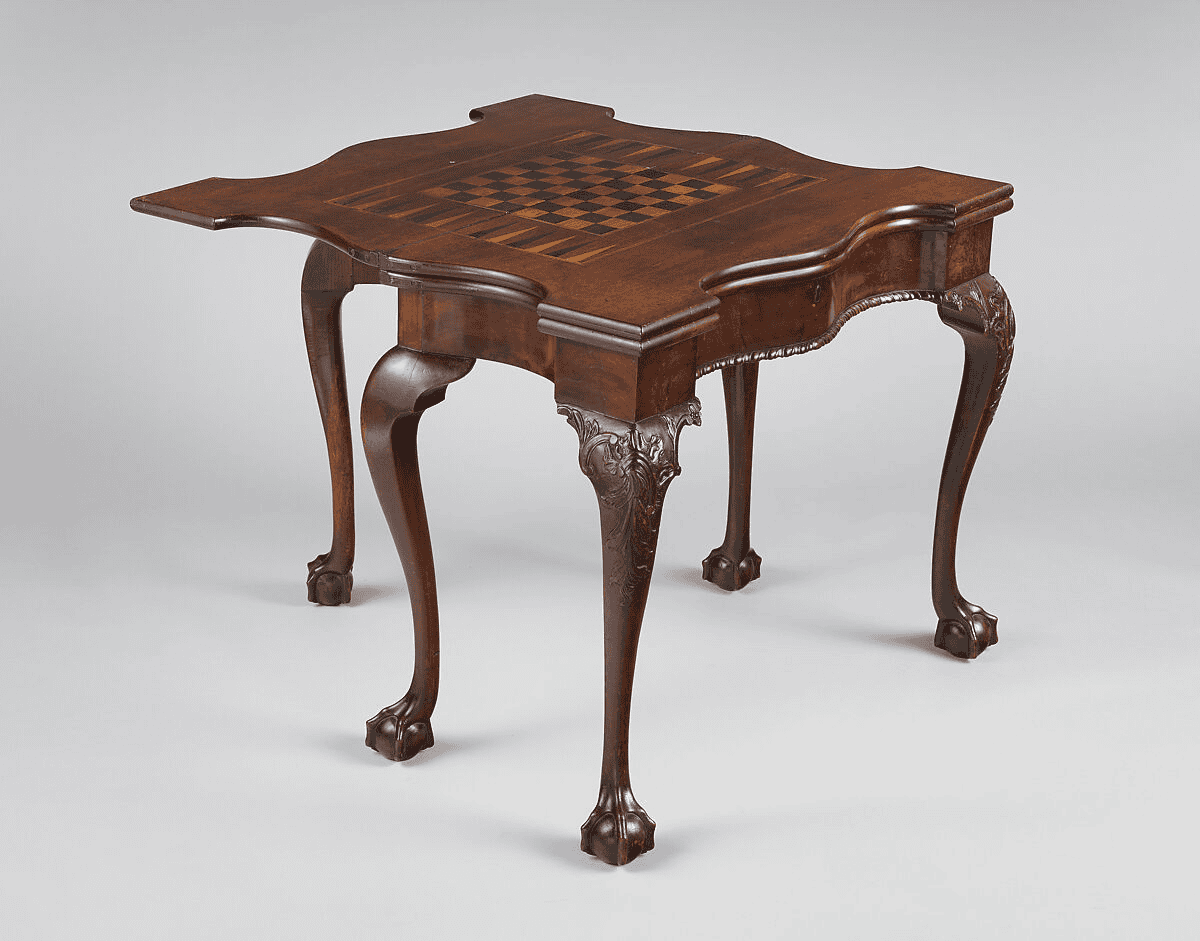
For example, an American card and backgammon table currently held by The Metropolitan Museum of Art was made between 1760-1790. It contains different surfaces for playing backgammon and chess as well as a lower surface covered in baize upon which one would play cards.
In addition, while the digital table has no mechanism to physically create separate areas or “surfaces” it does provide similar organization functions. It creates a visual “boundary” separating the active playing area from menu items, messages and other control options. This type of separation may help to clearly identify what the main activity being performed is, especially if the simulated tabletop is relatively plain and lacking in decorative details.
When the real world materials move into a digital environment they have changed. Cloth is a surface on which cards lie; an image of cloth is merely a visual reference. Wood grain does not serve to support the table; a painted railing does not serve as a place to lay your arm. These types of details do not perform the jobs originally assigned to them in the physical realm; instead they simply create a sense of setting.
Creating a Visual Relationship Between Player Information
More importantly, a “seat” represents a group of related pieces of information about a single player. Each piece of information related to a player should be grouped together so that other players’ information is visually distinguished.
On the other hand, the “center”, in a community card game environment, represents a space for all participants at the table. The center provides a common ground which can be distinguished from each participant’s own private cards. This provides a way to illustrate a visual distinction between information that belongs to a specific player versus information that is relevant to everyone playing at the same time.
For example, the anonymous tables at Bovada identify players with numbers rather than permanent usernames. This demonstrates why identification and placement are two independent design decisions.
It also allows for locating updates. For example, highlighting next to one player indicates who took an action. If there were no visual grouping and therefore no identifiable link between each update and the appropriate player, additional methods would have to be developed. A list could serve as a method for linking each update to the correct player; however they would represent information differently than the original grouping.
Familiar Objects in User Interface Design
Skeuomorphic designs take advantage of users’ existing knowledge of how physical objects work to influence their behavior in a digital environment. For example, using a card table to represent the digital environment suggests creating a place where users can gather around a central point (the table) and keep their belongings close at hand.
Knowing something because you recognize it, however, doesn’t necessarily mean you fully understand it. Knowing that someone has a deck of cards does not automatically provide full understanding of the rules for playing the specific card game. The tabletop will never be able to explain each and every rule for the game; nor will it be able to tell you exactly when you should perform an action or why you can’t press a button. Each of these needs its own solution.
A metaphor can also confuse objects and controls. Using a drawing of stacked chips on top of the table could simply indicate the quantity of chips. Labels and feedback would be necessary to differentiate between them.
In addition to providing visual explanations of the digital environment, metaphors for digital systems can include supplementary elements that would normally require additional instruction. Providing a countdown timer, labeling an action, or providing a running total of an item (to name just a few examples), do not need to visually mimic furniture. As long as they support the current state and/or task being performed, such supplemental elements can exist alongside other metaphors.
A Miniature Room Is Not Always an Interface
When playing in a virtual environment (small screen), beautiful decorations that surround the room compete for space with cards, numbers, and other control elements. In addition to providing relationships between players and their respective pieces, a layout can provide additional “screen space” by removing scenic elements from the display that contribute nothing to the task at hand.
In addition to layout, touch-based controls require the designer to consider the physical interaction requirements of the end-user. A creative artist can produce an exquisite looking object; however, if the interactive area associated with this object is too small or crowded by adjacent controls, it becomes difficult to use effectively.
Perspective also presents designers with constraints. While dramatic angles may create an atmosphere within your game, using flat views provides cards and labels more consistent space. Perspective is simply another aspect of the design trade-off and should not dictate how all games should have the same shape or viewing angle.
The best example of this idea has no relation to creating an exact replica of a real-life room. Instead, it focuses on maintaining relationships among players and their pieces that facilitate understanding of gameplay. The remainder of the presentation is focused on adapting those aspects to accommodate limitations inherent in digital displays.